Tasks and Stops
A Task says what needs doing. A Stop says where the Tour goes.
Preview of planned functionality
This article describes the intended standard Tour experience. Parts are not yet available; final screens may differ. Editing the plan and completing work require the relevant permissions.
Build a useful work list
A Task can exist in the backlog before it is assigned to a Tour. It can also have an individual assignee. Adding it to a Tour does not replace that person's assignment.
- Ordinary Tasks are completed by marking them done.
- Visit Tasks describe work at a location. Adding one to a Tour creates a Stop for the visit.
- Question Tasks ask for a response, such as text or a choice. Complete the interaction by answering the question rather than simply marking it done.
Arrange Tasks and Stops
The Tour has one ordered work list. A Task appears once, either inside a Stop or directly in that list. A Stop can contain several Tasks, and a standalone Stop can have none.
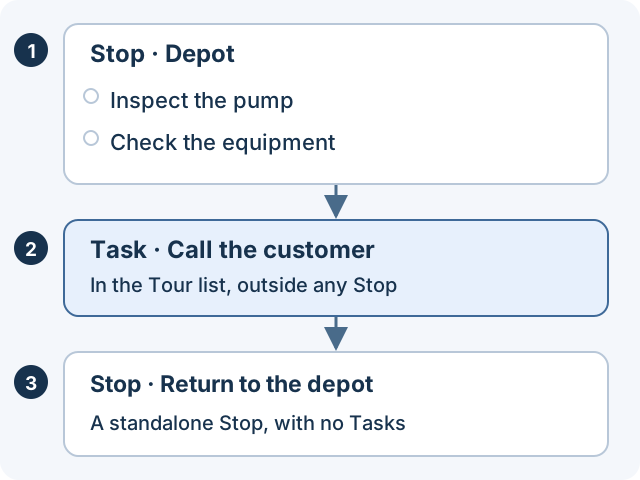
Use a standalone Stop for a destination such as returning to the depot. Use a Task without a Stop for work such as a phone call. Tasks at the same location can be grouped into one Stop when an authorized planner combines them; Tourfold does not merge nearby Stops automatically.
Reordering the Tour changes its planned sequence. It does not automatically optimize a route or change the Tasks themselves.
Complete the work
At a Stop containing Tasks, complete the Tasks. Its completion follows the work inside it. A standalone Stop has its own completion action.
Your teammates see updates to the same Tasks and Stops. If someone changed an item while you were editing it, refresh and review the latest state before trying again.
All assigned Tasks and standalone Stops must be complete before finishing the Tour. Once the Tour is finished, its work cannot be edited.
Common questions
Can a Tour have work without any destinations?
Yes. A Tour can contain only Tasks without Stops and does not automatically require a Vehicle.
Does removing work from the Tour delete the Task?
Removing a Task assignment keeps the Task itself. A Stop created for Tasks disappears when its last
Task leaves; a standalone Stop remains until explicitly removed.
Does moving a Stop change the Task's saved visit address?
No. The Stop's planned destination and a Task's visit location are separate. Check both when the
destination changes.
Next: Work on a Tour.